

How to Fix the CrashLoopBackOff Error in Kubernetes: A Step-by-Step Guide
Read Time:8 Minute, 7 Second
Short Description: Seeking ways to fix the CrashLoopBackOff Error in Kubernetes? Explore this post for the best steps to fix the CrashLoopBackOff Error effortlessly. Read on!
Often, users of the Kubernetes container face the issue of the crashloopbackoff error in the pod space. This usually happens when the pod crashes multiple times. This is a very common issue that Kubernetes users encounter. Some even start seeking DevOps services in India for the solution.But you don’t need to worry about it anymore. We have got you covered here in this post. This step-by-step guide covers all the necessary fixes that you can apply in order to get rid of CrashLoopBackOff Error in Kubernetes. Also, you will get to learn a great deal of information on crashloopbackoff and what causes such errors. So, without any delay, let’s get started…
What is CrashLoopBackOff?
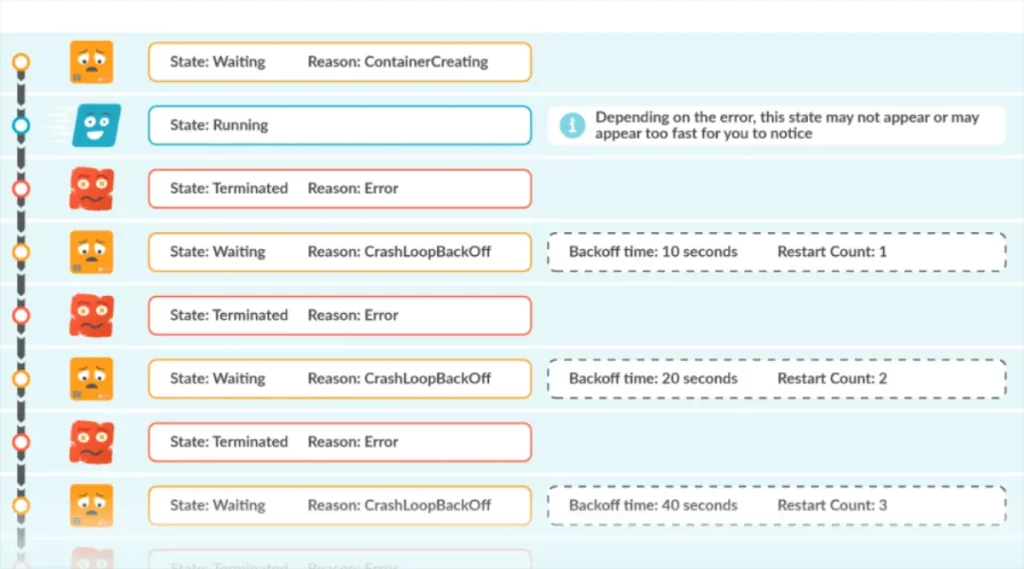
Kubernetes containers that repeatedly fail to restart show CrashLoopBack Off Error. This indicates persistent recycling of inside pods. It is a very common error that users encounter. It can be caused by a variety of issues. Some common problems include insufficient memory or resource exhaustion, deployment mistakes, third-party DNS errors, incorrect commands, port issues, or missing dependencies. Whenever this happens, Kubernetes starts showing a delay. This delay is known as a back-off period between restarts. During this time, one more effort is made to restore the crash within the pod.
How it Happens?
It happens when Kubernetes try to restart a failed container automatically. If it doesn’t start automatically, the pod will restart with an exponential backoff delay. The most important point here is that the backoff delays start to increase with each unsuccessful attempt. Eventually, the pod enters the state where you get to encounter CrashLoopBackOff error in Kubernetes. You can resolve this error by enhancing memory, adjusting resources, updating DNS configurations, or installing missed dependencies.
Why does “CrashLoopBackOff” happen?

Now that you have understood what CrashLoopBackOff is let’s understand the potential causes in detail:
- ImagePullBackOff: The container may fail to begin because the image pull process fails.
- OutOfMemory: Outofmemory is yet another reason for this error. It happens whenKubernetes containers exceed the memory limit.
- Application Bugs: The code errors within the application may cause containers to crash.
- Configuration Problems: Improper command arguments and environment variables may escalate the risk of crashes inside pods.
- Inaccessible Storage: The failure to access storage due to misconfigured paths may prevent containers from being backed up.
- Read-Only Resources: When running pods fail to write to read-only resources, they cause an error.
- Problems in Invalid Settings: Misconfigured permission settings stop resource availability, leading to CrashLoopBackOff error.
- Misconfigured Network Settings: Issues like network outages or bad networking setup result in crashes in the pod.
- Locked Files or Databases: Sometimes, when resources become locked because of other pod, it leads to CrashLoopBackOff error. This happens because new pods try to access blocked resources.
So, these are the reasons for CrashLoopBackOff error. Fixing them is easier than ever. Read the upcoming section for the step-by-step fixes to resolve the issue instantly. Read on…
Steps to Fix CrashLoopBackOff Kubernetes Status
Here are some tried and tested fixes to instantly get rid of the CrashLoopBackOff error. Take a look…
1. Test Back-Off Restarting Failed Container with Kubectl Describe Deployment
First, Kubectl describe deployment command detects deployment issues facing the CrashLoopBackOff. For this, you should list deployments using the Kubectl get deployments command.
Use the label selector to view enlisted pods related to the deployment. For instance, if your deployment is named cashmyapp, you can use it in the following way:
Kubectle get pods -1 app = cashmyapp -deployment
Next, you should use Kubectl describe pod to know more details:
kubectl describe pod <pod name> -n <namespace>
In the pod status section, you will get to see error messages associated with pods.
Back-off in Kubernetes handles failures or errors when relaunching containers. Whenever a failure occurs, K8 applies back-off algorithms to restart the container at delayed intervals until the failed attempts reach the last stage of limits.
2. Check the CPU and Memory of Pods
With Kubernetes metrics or other tools like Prometheus, you can check the CPU and memory of pods. If your application is consistently causing resource exhaustion because of over-usage, you may need to optimise the resources used. To ensure this, you can change resource limits. For this, head over to the Container’s resource manifest and do the needful.
3. Check the Logs of the Failed Pod Using the Kubectl Logs
Next, you should check the logs using the kubectl logs command. The previous or—p flag enables retrieval of the last used pod logs when viewing system events. It allows users to monitor application behaviour during failure instances.
Selecting the log data from one or multiple containers requires the –all-containers flag in the command. You can display the end section of the log file. For this, it is vital to use the —tail flag.
3. Use the Latest Docker Version
Another method that you can use to fix the CrashLoopBackOff error is updating the Docker software. It is one of the best ways to get rid of the issue among other plugins. To resolve the problem, you should prevent inconsistencies within the environment that cause this error. Also, you should avoid deprecated commands. Porting projects into a Kubernetes cluster allows you to downgrade several Docker versions. This is essential to support their income project specifications.
4. Allow All-New Mount Creations to Adhere to the Default Access Level
To resolve the error, you should allow all mount creations to adhere to the default access level inside the pod and ensure that new pods using custom tokens comply with the access level to avoid continuous startup failures.
5. Automatic Fixing of the Error
In a few cases, the CrashLoopBackOff error occurs when you update the container with new changes. In this scenario, the error resolves when the nodes receive the optimal resources in a stable environment.
6. Use the kubectl Get Events to Check the Events
Next, you should examine the K8 algorithms using the kubectl get events command. This allows you to view the events before the pods fail. If viewing the events from a single pod, use the—field—selector flag.
Let’s now take a look at the tips to avoid this error. Here we go…
Tips to Avoid CrashLoopBackOff
Here are some of the best tips you can implement to avoid CrashLoopBackOff error in Kubernetes. You can use these tips as and when you encounter issues with this open-source system. Have a look…
- Avoid misconfigured values or typos in configuration files.
- Go to the configuration file to check the resource limits for their optimal usage.
- Ensure two or more containers in the same pod space are using different ports.
- Ensure that whatever files or databases you are accessing support proper locking mechanisms.
- Reverfiy all references of resources to ensure their end-points and configuration paths are correct.
- You should ensure command line agreements are valid.
- Check all the files are configured correctly.
- Check the pod has specific permission to perform the task.
- Ensure that pods can write to read-only resources.
- You should make sure environmental variables are correctly installed.
- Ensure liveness probes are correctly configured. This will help prevent premature relaunching.
- Use resource requests and limits. This will avoid the issue of the resources’ over-usage or minimal allocation.
- Check the proper completion of Init containers. This will save the pod from the crash.
- Ensure the network configuration or DNS settings are correct.
- Inspect environmental variables to use env, ensuring they are correct.
Wrapping it up…
So, these are the fixes you can use to get rid of CashLoopBackOff Error in Kubernetes. Know that fixing the CrashLoopBackOff error in Kubernetes is very easy if you use a systematic approach. You need to be patient and execute the right fix in order to get rid of the issue. A systematic approach is essential, starting with identifying the root cause, followed by examining logs and implementing the necessary fixes. By following this step-by-step guide, you can effectively detect and resolve the error, ensuring smoother deployments and more stable workloads in your Kubernetes environment. Aside from that, following preventive tips can help you keep the issue at bay in the future. Thanks for reading! Hopefully, this information helps you detect and fix the error in a timely manner.
FAQs
Q1. How do I check logs for a pod stuck in CrashLoopBackOff?
Use the Kubectl logs <pod-name> to check logs for a pod stuck in CrashLoopBackOff.
Q2. What does kubectl describe pod show and how does it help?
kubectl describe pod shows extensive information about a specific pod. This encompasses metadata, current status, resource usage, and events. It is useful for troubleshooting issues.
Q3. How can I fix a failing liveness or readiness probe?
To resolve a failing liveness or readiness probe, use the following tips:
- Carefully review your application’s startup procedure
- Check for network issues
- Test the application log for potential threats
- Accordingly, you can adjust readiness probe parameters such as initial delays and timeouts.
Q4. What should I do if my container crashes due to a command or entrypoint issue?
The first step you should take is to identify the problematic command or entry point when your container crashes. After that you can use relevant tools to debug the issue within the Kubernetes container.
Q5. How do I restart a pod after fixing the issue?
You should use the command kubectl rollout restart deployment/<deployment-name> in order to restart a pod after resolving the issue.

Happy
0 %

Sad
0 %

Excited
0 %

Sleepy
0 %

Angry
0 %

Surprise
0 %
 0
0
 0
0