How to Choose a Control Room Video Wall for 24/7 Monitoring
Read Time:3 Minute, 43 Second
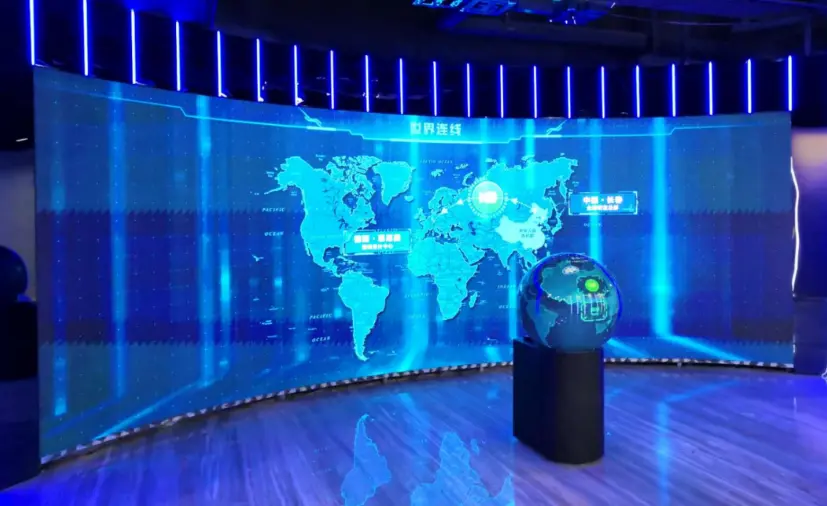
A control room screen is not just a large display. It becomes part of the daily operating rhythm: alerts stay visible, camera feeds keep moving, maps update, and teams need to read the same information without crowding around a workstation. When that wall runs all day and all night, the wrong choice usually shows up in small but expensive ways: unreadable text, awkward layouts, hot equipment, slow maintenance, or a room that cannot adapt when more data sources arrive.
The best starting point is not the screen size. It is the work the room must support.
Start With What Operators Need to See
Before comparing LED cabinets or display specs, list the content that must stay visible during normal operation. A security control room may need camera grids, incident maps, access control dashboards, and communication windows. A utility or transport center may need GIS views, sensor alerts, SCADA screens, and live reports.
This matters because each content type has a different readability requirement. A pixel pitch is the distance between LED pixels; a smaller pitch usually supports sharper text and closer viewing, but it can also raise cost. If operators sit close to the wall and read detailed tables, the design needs more pixel density than a wall used mainly for large camera feeds.
A simple planning question helps: what is the smallest piece of text or data that must be readable from the main seating position?
Match the Wall to the Room, Not the Other Way Around
Control rooms often have fixed constraints: ceiling height, console depth, viewing angles, HVAC paths, power access, and maintenance space. A wall that looks good in a showroom can feel overwhelming in a narrow operations room.
For 24/7 use, pay attention to three room-level factors:
- Viewing distance: Can operators read critical data without leaning forward?
- Sight lines: Can every seat see the highest-priority content?
- Service access: Can panels or modules be reached without disrupting the room?
This is where a solution-based page is more useful than a generic product page. Esdlumen’s Corporate page describes a process that includes needs and space assessment, tailored system design, and installation with training, which fits the way buyers should evaluate a control room video wall solution after defining the room’s actual monitoring workload.
Think About Uptime Before You Think About Brightness
Brightness matters, especially in rooms with ambient light, but uptime matters more. A control room display is usually expected to support continuous awareness, not occasional presentations. Refresh rate, contrast, heat management, and maintenance access all affect how the wall performs over time.
Refresh rate refers to how often the image updates per second. In a control room, a stable image helps when screens show moving video feeds, maps, or dashboards for long shifts. Front maintenance can also be important because it allows service from the viewing side, which can reduce the need for rear access space.
Industry discussions around command-and-control AV, including AVNetwork coverage of real-time operations centers, often point to LED displays because they can provide a seamless visual canvas, flexible layouts, and easier module-level service than some older display approaches. That does not mean LED is always the only choice, but it explains why many new control room projects start there.
Plan for the Content System Behind the Wall
A video wall is only as useful as the sources feeding it. The display may need to show IP cameras, dashboards, conferencing windows, emergency alerts, maps, or third-party software. Ask early how sources will be routed, resized, prioritized, and controlled.
The wall should support the operators’ decision flow. If the team needs to compare multiple incidents, split layouts matter. If supervisors need one shared operating picture, a large unified canvas matters. If different shifts use different dashboards, content presets, and remote management becomes part of the design conversation.
Choose for the Next Five Years
A good control room video wall should not be sized only for today’s feed count. More cameras, sensors, departments, and dashboards tend to arrive later. Leaving room for expansion, service, and layout changes can prevent an early redesign.
The practical path is straightforward: define the room’s monitoring tasks, confirm viewing distance and readability, choose a display type that fits the uptime requirement, and check whether the supplier can support assessment, installation, training, and maintenance. That kind of planning turns the video wall from a big screen into a reliable operating tool.

Happy
0 %

Sad
0 %

Excited
0 %

Sleepy
0 %

Angry
0 %

Surprise
0 %
 0
0
 0
0